For some reason, I really enjoy recreating analog components on Android. Today I’d like to share my experience of re-creating a knob that looks like this:
As you can guess, this type of knob does not have min/max bounds and can be freely rotated as much as you want. This type of control is often used for browsing through a list of options that can be wrapped around. Also, an important property is that this knob does not rotate smoothly but switches from one nick to another. You can imagine that it also clicks when you rotate it – and our Android replica will also make that sound!
Here’s how the Android version looks:
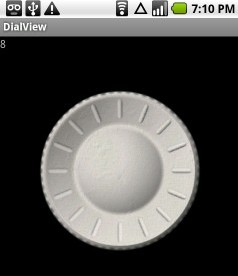
I’ve included the source into this article. However, please be warned it is not completed and you will need to fix or finish few things before you can use this code in your own app.
And now, let’s get down to work!
Decomposition
If you have some experience making custom analog-looking controls, then you know where to start. We start with separating everything we draw into layers:
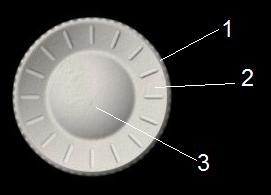
#1 is the outer circle, it has small dents on it and shadow that falls from the top left corner to the bottom right corner almost as a linear gradient. #2 is the inner circle. It contains the nicks and has an opposite shadow to the inner circle. That creates the look that the inner circle is embossed in the control. Now, #3 is a round piece that I call the center. It has a radial gradient that makes it look spherical, and a blurred light circle around it that separates it from the inner circle nicely.
It’s important to understand that all three layers will rotate when you rotate the knob, except for their shadows. That means we have to draw shadows separately.
Realism
First of all, I used BlurMaskFilter in various places to make the boundary lines, dents and shadows look really soft. In addition, I used the following texture for realism (click to see):

The problem with this kind of control is that, unless there is something that an eye can stick to, you won’t see any motion when you switch from one nick to another. It’s obvious since this control is structurally the same regardless of rotation. Thus I tried to overcome that problem using the following small tricks:
- The texture has some scratches that visibly rotate when you rotate the knob
- Nicks have a bit different length, very slight but that should enough for the brain to notice
- Rotation is not 100% precise, there is some random backlash
It seems to me that these tricks make the rotation visible and not confusing to the eye. Of course, we could just add a marker or make one of the nicks of a different color. However, that would make the result different from its original counterpart.
I’m using SoundPool to make the sound. You can read my article on WiseAndroid to learn more about SoundPool.
Optimization
I created a simple class called DrawLayer (perhaps I’ll rename it later) and cache all drawing into a set of draw-layers and only draw the bitmaps when it’s time to onDraw().
It’s important to rotate only the plastic layers and not to rotate the shadow layers.
Conclusion & Source
This is how I approached replicating an analog rotating knob. If you have any ideas how to improve it, you are welcome to suggest in comments.
Also, if you grab the source, please remember it’s just a prototype that needs to be improved and cleaned up.
Otherwise, I hope this was helpful or at least interesting. Have fun!
Attachment: the source




[...] This post was mentioned on Twitter by Craig Russell, Ivan Memruk. Ivan Memruk said: Android UI: Making an Analog Rotary Knob http://su.pr/2xbQAV [...]
Nice! You’re using the data jog wheel from an MPC.
Shh, don’t spill the beans Donn
Would you share a higher res version of this lovely knob? I am doing the video for the SMPTE (Society of Motion Picture and Television Engineers) awards show and I want to do a shuttle effect of movies and tv in a timeline with an analog knob at the bottom.
Amy,
If you just need a bitmap of the knob, this is the highest resolution that I have
However, I took the knob design from Akai MPC and you can find a lot of pics online:
http://images.google.com/images?hl=en&safe=off&biw=1280&bih=685&gbv=2&tbs=isch:1&sa=1&q=akai+mpc+500&aq=f&aqi=g2&aql=&oq=&gs_rfai=
Hi Ivan great job,
i searched some clear and pragmatic totorian on the web for a while.
I will modify it becouse i need a nkob a little bit differet with one externat corone that can have five precise position.
I will use it in my project that i developed initialli wiht LWUIT framework in MJE.
The android app will be use to control by SMS and BT a micro device based on Atmel Atega32 pic.
I use i to control motorhome warming device.
Thnks for your help
Mirko Ugolini
PESARO (ITALY)
Cool! Can I have a link please?
Hi Ivan,
this is my web site:
http://web.tiscali.it/mirkougolini/
unfortunately is not updated.
The new version is monoboard for save space and make it more cheap.
I introduced a BT module that allow the module to be controlled in a better and cool way.
As you can see i made midlet gui for mobile that support Java
but i incontered a lot of problem for porting the app in different mobile.
So i decided to pass to android:
I bought a Galaxy s, a good book and i started to study the new facinating device hopin that it will be more easy to develope an spread my application on different android compliant device.
I made some modification to your control and it works like a charm.
Now i would like to create a new widget for setting 24h cronotermostat parameters and send that settings tho the atmel device. At the moment the settings
are defined using the poor 2*16 LCD int
erface and as you can imagin is not soo userfredly.
If i incontered some problem durind the developing of my new component can I boring you with some question an explanetion?
Regards
Mirko Ugolini
Mirko,
Sure thing. I’m not as responsive lately but I’ll be happy to help as much as I can.
Hi Ivan,
I got that problem,
I have a array of Object
lake this:
LU[] punti = new LU[24];
…
public class LU {
private int _x1; // coordinata LeftTop x
private int _y1; // coordinata LeftTop y
private int _x2; // coordinata RightBottom x
private int _y2; // coordinata RightBottom y
private float _middley;
private int _value;
private String tmp;
public LU(int value) {
this._value = value;
}
public void setValue(int value) {
this._value = value;
}
public int getValue() {
return _value;
}
public float getX1() {
return _x1;
}
public float getY1() {
return _y1;
}
public float getX2() {
return _x2;
}
public float getY2() {
return _y2;
}
public float getMiddle() {
return _middley;
}
public void setMiddle(float middle) {
this._middley = middle;
}
}
is it possible to persist (in Android) such arry of object ?
How?
Regards
Mirko
Where do you intend to persist it Mirko?
Hi Ivan
I have found a good product
http://www.neodatis.org/start
Mirko
Hi,
I’m pretty impressed by this, I’m in a analog metronome project right now and I’ll need some rotary knobs like this, much simpler though (I don’t need the nicks neigther the “click”) . But I was wondering, how do you place it, lets say on a png background ? It must be an exact pixel positioning. Is it possible, when we know android devices can be very different and have many different resolutions ?
Alex
Hey Alex.
I’m not sure I understood your case.
Could you please go into detail a bit? I will be happy to help you as much as I can.
-Ivan
Hey, thanks for a so fast answer
So, let me explain a bit. I’m working on a clone of a famous drummer metronome. To be the closest as possible of the original, I scanned the metronome and photoshoped it to fit my needs. I basically obtained this : http://87.106.96.17/scantama.png
You see I left empty circles to insert the knobs. But now, I have the feeling it will be hard to place them, independantly of the resolution. What is your recommendation on this ? Maybe the png background approach is bad and I’d better drawing everything ?
Alex
First of all let me tell you that I love your idea, as I do all attempts to revive analog devices.
Now in your case you do need to put your knobs precisely on the background.
My intuitive recommendation would be to take control of background scaling, i.e. scale it manually in your code and then place it on your screen. You can scale them by getting screen parameters first (using DisplayMetrics or whatever) and then deciding how you scale the bg.
Now if you have the parameters xScale and yScale which you used to scale the background, you can now use them to re-position your knobs by taking their original x and y and multiplying.
Does this make sense?
Yes, this sounds great. I didn’t know if it was possible or not.
If I understand well, I’ll use AbsoluteLayout and re-place everything at runtime ?
Thank you so much for your help
Yes, perhaps something like that. You want to position your views manually. Good luck (and show me your app when it’s done
)!
Thanks, I’ll keep you informed, promised !
Hello Ivan,
brilliant idea, the background scaling is working like a charm. The UI is almost OK. I’ve one more question for you although : why adding/replacing the DialModel in the onRestoreInstanceState method in the View ? It works pretty well on the emulator, but on my handheld device, the call to removeListener(this) and then to addListener(this) is “forgetting’ to rebind the Activity, which is also a listener ? After that, the textview isn’t noticed of the dial changes any more.
Here is my fix, what do you this of it ? I don’t understand why we should recreate a model if it exists.
public final void setModel(DialModel model) {
if (this.model != null) {
//this.model.removeListener(this);
invalidate();
return;
}
this.model = model;
this.model.addListener(this);
invalidate();
}
I hope you got it, english is not a mother tongue for me :ss
Neither it is for me.
I think the problem is that the old model will not be updated with new events. I wrote this code a while ago but please check that possibility. In traditional MVC, only one model is active for a given MVC component. That is an assumption upon which I also built this component.
Thank you so much for the reply, I’ll check this.
Rgds, Alex
Maaaan, nice piece of math in onScroll() and rotate(). Did you write this from scratch ??
For the model problem, it seems to me my method is working properly, but I must double-check to be sure.
Hi Slash4.
I did write this from scratch. I wish I didn’t – I hate math!!
Could you send me a link when you finish your work? I’m really curious about anything that is based on what I write here – makes me feel good.
Sure I will. I’m at 50% of the project right now, a V1.0 should be out next week.
I’ll keep you informed
Rgds, Alex
Nice ! The reproduction of real-life controls on screen is very worthwhile and fun. I like to suggest the equally important issue of adding sound effects and even tactile feedback
to enhance the realism further. I got myself an Olympus LS-11 recorder which has proven handy for capturing the sound of controls being actuated. You then edit these with precision in tools such as Adobe Audition or similar and can pull them into Eclipse as resources. By pre-loading a sound it can then be quickly rendered in conjunction with graphical movement. To use feedback the same use of vibrator as for keyboard input can be utilized.
Gunnar,
That’s an amazing idea.
I tried this a bit – my Su-Preme MPA app (illustrated here: http://mindtherobot.com/blog/748/su-preme-mpa-the-first-demo-video-of-my-first-app/ and available for free on the Market) features a dial wheel with tactile feedback.
People say it feels real nice
-Ivan
Hi Ivan,
can you tell me how I can send you an apk ? I didn’t manage to find an email adress to write to (and I think it’s on purpose
Would you mind send me an email so I can reply with the attached file ? The Metromone is fully fonctionnal now, I just need some extra time to write a little user manual and build a configuration menu.
Rgds, Alex
Hey Alex.
Just sent you an email. Thanks.
-Ivan
This is awesome! Exactly what I’ve been trying to figure out how to do for almost a year.
Thanks!
Glad it was useful Quartertone.
-Ivan.